
United Airlines
United AirlinesTravel & Local
4.744.95K Reviews
- Version
- 4.2.103
- Installs
- 10.00M
- Age Rating
- Everyone
Screenshots


Our Review of United Airlines
 Analysis by Appyee
Before deciding whether to install it, I’d separate the app’s price from the cost of flying: United Airlines is free to download, so trying it does not require an app purchase. That makes it an easy companion to test if you already have a United trip, though the app’s usefulness naturally depends on whether you choose to travel with this airline.
What free access is useful for
In my view, the strongest reason to keep a United travel app is having trip details and flight tasks together rather than hunting through email, a browser, and separate airport tools. It is built by United Airlines, and its focus is the practical stretch from planning and checking in to handling changes while you are on the move. I would not treat a free download as a reason to book a particular flight; I’d compare the itinerary and travel arrangements first, then use the app if United is the carrier.
The app has a 4.7 average from around 904,000 ratings, and it has passed 10 million installs. Those figures suggest that many travelers find it useful, but they are not a promise that every trip will go smoothly or that every screen will suit every traveler. Its Everyone age rating makes it broadly suitable for general audiences. The current version is 4.2.60, and it requires Android 10 or later, so someone using an older Android device should check compatibility before relying on it for an upcoming trip.
Where the value comes from
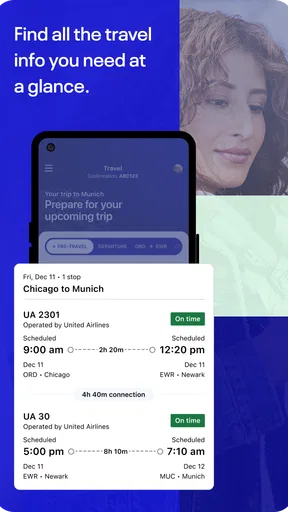
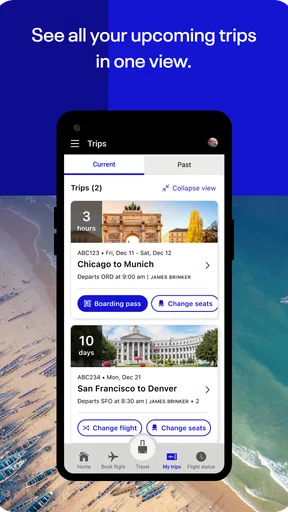
For a traveler who has booked with United, convenience is the real payoff. Flight and reservation details, check-in, a mobile boarding pass, MileagePlus information, airport maps, support, entertainment, and bag tracking are all described as part of the experience. Having these travel tools in one place can reduce small, avoidable hassles, especially when you are away from a desk and need to check something quickly.
I’d think of it as an airline companion, not a universal travel planner. A general travel app may be better for comparing several airlines, keeping a broader itinerary, or organizing local activities. United’s app makes more sense once your plans involve United and you want airline-specific information close at hand. The trade-off is focus: its convenience is meaningful for that trip, while it may add little for someone who rarely flies with the airline.
Features That Fly High
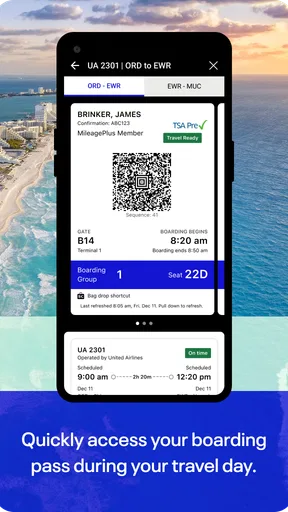
From the get-go, the United Airlines app is all about making your journey smoother. You can book flights, check your reservations, and even get real-time updates on any flight changes. It’s like having a crystal ball, but for flights. The app also lets you check in with just a few taps. Gone are the days of scrambling through emails for your boarding pass—it’s all right there in the app.
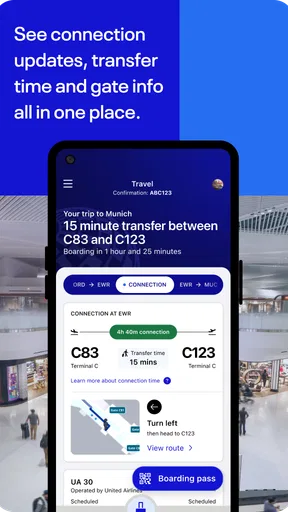
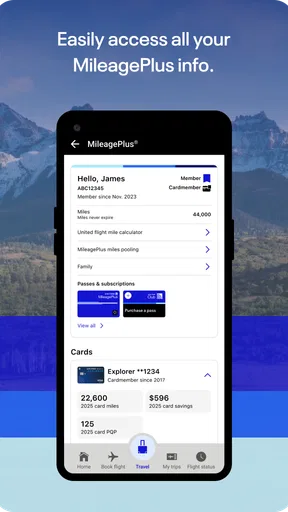
If you’re a frequent flyer, you’ll love the MileagePlus integration. You can track your miles, view your status, and even redeem rewards without breaking a sweat. Plus, the interactive airport maps are a lifesaver when you’re running late and can’t remember if your gate is in Terminal A or Z.
What I Absolutely Love
One feature that stands out is the live chat support. If you’ve ever been stranded at the airport, you know how priceless this is. You can reach out to customer service directly through the app, which beats waiting on hold for hours. Another neat trick is the in-flight entertainment section. You can stream a selection of movies and shows right on your device. How cool is that?
Oh, and did I mention the ability to track your bags? It’s as easy as pie. No more biting your nails at the baggage claim, wondering if your luggage decided to take a vacation of its own.
A Few Bumpy Spots
While the app is generally fantastic, it’s not without its hiccups. Occasionally, the app can be a bit sluggish, especially when you're trying to make last-minute changes. And sometimes, the interface can feel a tad cluttered, with so much information vying for your attention. But hey, no app is perfect, right?
Some users have reported issues with the app logging them out unexpectedly. It’s a bit of a pain, but hopefully, these are just minor turbulence that will get smoothed out with future updates.
Getting more out of it on travel day
I find the app most useful when I set it up before I leave home, not when I am already hurrying through an airport. I’d open the reservation while I have a steady connection, check that the trip details look right, and make sure I can find the boarding pass area. That small rehearsal matters: it turns the phone into a backup for travel paperwork instead of a new thing to figure out in a security line.
A practical scenario is a connection day when plans shift. I would check the flight information in the app, then use its airline-specific details to understand what changed before deciding what to do next. If I need help, the in-app chat can be a convenient route to try, while keeping the itinerary visible gives me context for the conversation. I would still save the key booking information somewhere accessible outside the app, because relying on one screen or one login is not a great travel habit.
The airport map has a different kind of value: it is most helpful when you need orientation, not when you are already at the gate. I’d look up the layout as soon as I know which airport I’m navigating, then use it to plan where to go rather than trying to learn the terminal while rushing. And for bag tracking, I see it as reassurance and a way to check progress—not a substitute for keeping your claim information and luggage identifiers handy.
When another travel tool makes more sense
Compared with a general itinerary organizer, this app is narrower by design. It is a better fit for checking a United reservation and using United’s trip tools than for bringing every airline, hotel, and activity into one broad plan. If you are comparing fares across carriers, I’d start with a comparison service or airline websites, then turn to the United app after choosing a United itinerary. That division of labor avoids expecting an airline app to be a neutral travel marketplace.
Likewise, I would not make the app my only source of directions around an unfamiliar city. Its maps are aimed at airport navigation, while a dedicated mapping app is the more natural choice for streets and local transport. During a flight, the entertainment section may be useful when available, but I would not assume it replaces a traveler’s own offline plans. Downloading or preparing anything you want to use before boarding is a sensible precaution, particularly when connectivity is unreliable.
Another useful trade-off is account access. MileagePlus tools are relevant if you use that program; they matter much less if you do not. If you travel only occasionally and already have a simple way to retain your confirmation and boarding details, installing another app may not change much. For repeat United flyers, though, keeping the account and trip information together can make the extra app worthwhile.
Small frictions worth planning around
Because the app gathers many kinds of information, the screen can feel busy when all you want is one answer, such as a gate or check-in detail. I’d make a habit of opening the trip section before travel day and learning where the essentials sit. That is a more useful response to a crowded interface than tapping around under pressure. The reported sluggishness and unexpected logouts also make a backup plan sensible: retain the confirmation email and avoid assuming a single app session will always be ready at the exact moment you need it.
For last-minute changes, convenience has a limit. A mobile screen can make it easier to review a reservation, but changes can involve choices that deserve a careful read. I would pause to confirm the itinerary and passenger details before submitting anything, rather than treating a quick tap as automatically reversible. If the app is slow or the information is unclear, switching to another United support channel is more prudent than repeatedly retrying and risking confusion.
Who will get the most from it
I’d recommend it most to people who fly United often, travelers who want their boarding pass and itinerary on hand, and MileagePlus members who check or use their account during trips. It can also help someone less experienced with flying by putting check-in, flight updates, and airport orientation in a familiar mobile workflow. The best payoff comes when you actually use those airline-specific tools, not simply because the app is popular or free.
I’d skip it, or at least avoid depending on it, if you do not fly United, prefer to keep travel plans in one independent organizer, or use an Android device below the stated minimum. It is also not a replacement for checking your booking carefully or keeping essential trip information accessible in another form. iPhone users can consider the iOS version, while Android users should make sure their device meets the requirement before installing.
The Final Boarding Call
All in all, the United Airlines app is a must-have for anyone flying with United. It simplifies the entire travel process, from booking to landing. While it has a few quirks, the benefits far outweigh any minor inconveniences. So, next time you’re flying, give it a whirl and see how it transforms your travel experience. I’d say it’s a first-class upgrade for your phone!
My verdict is more specific: because access is free, I’d try it when I have a United trip and decide whether its trip tools fit my routine. I would not install it expecting a complete solution for every airline or every part of a holiday. For the right traveler, the value is having United-focused information and actions within reach; for everyone else, a general travel organizer or the airline they actually use is the more practical choice.
Privacy and Permissions
See what permissions an app requests and how it handles your data.
- Calendar
- read calendar events plus confidential information, add or modify calendar events and send email to guests without owners' knowledge
- Location
- approximate location (network-based), precise location (GPS and network-based)
- Phone
- directly call phone numbers, read phone status and identity
- Photos/Media/Files
- read the contents of your USB storage, modify or delete the contents of your USB storage
- Storage
- read the contents of your USB storage, modify or delete the contents of your USB storage
- Camera
- take pictures and videos
- Wi-Fi connection information
- view Wi-Fi connections
- Device ID & call information
- read phone status and identity
- Other
- view network connections, change network connectivity, connect and disconnect from Wi-Fi, full network access, control Near Field Communication, run at startup, draw over other apps, control vibration, prevent device from sleeping, read Google service configuration
Verdict
Strengths of United Airlines
- Easy-to-use interface and navigation.
- Real-time flight status updates.
- Mobile boarding pass availability.
- In-app seat selection and upgrades.
- Integration with MileagePlus loyalty program.
Limitations of United Airlines
- Limited offline functionality.
- Occasional app crashes reported.
- Some features require strong Wi-Fi.
- Limited language support.
- Frequent login requirements.
Similar Picks in This Category
View All
Google Maps
Google LLC3.4

Google Maps Go
Google LLC4.1

Booking.com: Hotels & Travel
Booking.com Hotels & Vacation Rentals4.8

Google Earth
Google LLC3.8

Skyscanner Flights Hotels Cars
Skyscanner Ltd4.8

trivago: Compare hotel prices
trivago N.V.4.4
Frequently Asked Questions
What features does the United Airlines app offer?
The United Airlines app provides a range of features designed to enhance the travel experience. Users can book flights, check flight status, and receive real-time notifications about gate changes or delays. Additionally, the app allows for mobile boarding passes, seat selection, and access to in-flight entertainment options. MileagePlus members can also manage their accounts seamlessly.
Is the United Airlines app available for both Android and iOS?
Yes, the United Airlines app is available for both Android and iOS devices. Users can download the app from the Google Play Store for Android devices and the Apple App Store for iOS devices. The app is regularly updated to ensure compatibility with the latest operating system versions and to integrate new features.
Can I manage my MileagePlus account through the app?
Absolutely, the United Airlines app provides full management of the MileagePlus account. Users can view their mileage balance, check their status level, and see recent transactions. Additionally, members can use the app to book reward travel, making it a convenient tool for frequent flyers who want to track and use their miles efficiently.
How does the app improve the check-in process?
The United Airlines app simplifies check-in by allowing users to check in 24 hours before their flight. Travelers can receive a mobile boarding pass directly on their device, eliminating the need for paper copies. The app also supports seat upgrades and changes, making it a flexible tool that streamlines the pre-flight process.
What are the system requirements for the United Airlines app?
For optimal performance, the United Airlines app requires Android version 7.0 or higher and iOS version 12.0 or later. These requirements ensure that the app runs smoothly and supports all available features. Users should ensure their devices meet these specifications for a seamless experience.
